










An Email has become an indispensable tool for internet communication and marketing. Whether for personal, for work or school, or for business purposes, we all need an email account to communicate online. It’s no surprise, then, that email marketing has become one of the most effective tactics for increasing business sales, which is why, if you’re starting a business, you’ll need an electronic email account.
In this article, we’ll learn how to create a basic email account for free. We’ll also learn some tips about email accounts as well. Because many businesses still engage with partners and potential clients via email, having a personalized email address can be highly beneficial.
WHAT IS THE IMPORTANCE OF AN EMAIL ACCOUNT?
Just like everyone has a physical address, in this technological era that we’re living in, everyone needs an email address to communicate online. ‘But, I never receive an email’, some people might say, ‘do I still need an email?’ The answer is YES! In fact, if you possess a smartphone (Android, or iPhone), you need an email in order to download the Play Store or App Store in order to download basic apps on your phone. Some people ask friends or family members to set up their mobile gadgets for them. That family member, instead of creating a personal email account for the device’s owner, they just use an email account that belongs to them (that family member) rather than the device’s owner. That’s why some people might think they don’t need an email or they never receive emails, but in reality, to verify your device, to set up some accounts, you would need to verify your account through an email.
HOW TO CREATE AN EMAIL ACCOUNT FOR FREE
First, you need to choose an email provider. An email provider is a company (or a website) that will give you access to create an email and to access it. We might compare this company to a village that rents you for ‘free’ a piece of land to live in. Is it really free? Well, you don’t pay for it, but they send you a lot of advertisements. That’s how they make money. Here are some free email providers:
- Google Mail (Gmail)
- Yahoo Mail
- Outlook (provided by Microsoft)
- AOL Mail
- iCloud Mail
- and a few others
If you have an Android phone, I suggest you create a Gmail account. To do that, follow the steps below:
- Go to https://Gmail.com (alternately, you can go to google.com and click on Gmail, or just search for Gmail on your phone or on your computer.)
- Click on “Create an account”
- You can change the language as well, if needed. Chck the top or buttom of the page.
- Fill out the requested information (name, personal info, username and password….)
- AND VOILA! You have create your first electronic mail by yourelf.
- Some website will automatically suggest you a username based on your name.
- You might have to accept some Terms and Conditions, so check the appropriate box.
- And then, clik on the “Enter” button to continue, or click on Next, or Continue
- They might ask you for Optional infomation, like phone number. Skip them for now, you can update them later in the Settings.
- They might ask for an alternate email address. Skip it, if you don’t have one.
- If you choose to input your phone number, they will most likey send you a verification code (data rate may apply)
- If you get a code through a SMS, copy or note this code, and paste it, or type it in the appropriate box.
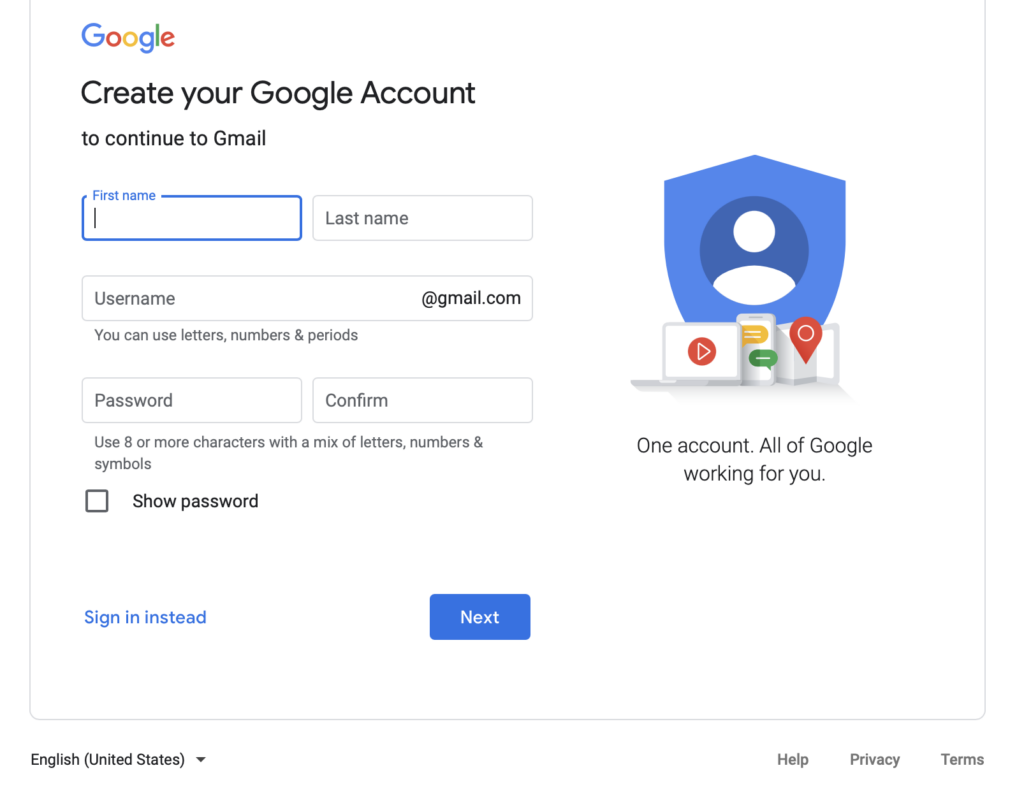
To create an account with another provider, the process is usually similar. For Yahoo Mail, Go to mail.yaoo.com or search for it. For Microsoft Outlook, go to outlook.com; for Apple, type icloud.com and AOL is login.aol.com, and so on.
HOW TO CHOOSE A USERNAME
Your username is the first part of the email before the “@” (called “at sign”). You can choose any type of username that you like, but, personally, I prefer a short one, a nice one, one that you can read and remember easily 😎. But keep in mind that, it will not be easy to find a simple username, because these email providers have millions of accounts already 💁. For example, if your name is John Smith. Most likely, you will not find john@gmail.com (the website will tell you ‘that username is not available;’ you will probably not find johnd@gmail.com, so, you will need to be creative, and innovative. You might find these account options:
- FirstName.LastName@provider.site: john.smith@creole101.com (emails are not case sensitive)
- FirstName-LastName@provider.site: John-smith@yahoo.com
- FirstName-23-LastName@provider.site: John15-smith@aol.com
- FirstNameLastN_Initial1234@creole101.com: John_s13@icloud.com
- Or a created word StrongyName@provider.com
- Etc…
HOW TO CREATE A STRONG PASSWORD
Some tips on how to create a strong password: First, chose at least 8 characters, chose a combination of UPPERCASE and lowercase along with some digits and symbols. Follow the tips below:
🛑 DON’t chose a password like these
12345678AAAAAAAILOVEYOULovely(Don’t chose a word in dictionary because, somputer programs called bots are cappable to try a lot of word combintion until they find itFirsNameLastName
✅ DO CHOSE a password like these
- Create a sentence like this: 1 Chocolate and tea – I love them so much! and make up your password with the initial ketters:
- ✅ 1CdT-IlTsM!
- This password has 11 characters, UPPERCASE, lowercase, symbole, and digit. 👍👌
- Or innovate your own words: ✅ Chocol8te!
- Use a word, and remove the vowels. An exemple with Chocolate and Lover: ✅ Chclt-Lvr3
- Allwasy take note and save your passwords, some apps or some browsers might help you to do that.
- NB: Don’t use the same password for multiple websites or account. You might use the same base password, but change a few characters in each.
HOW TO SECURELY USE MY ACCOUNT ON MY PHONE AND ONLINE
Just like you would not give your address to anyone, don’t give out or don’t share your email to every website. Especially, don’t share your password in public, like in youtube comments, or posts. NEVER share your password, except if you really have a good reason for that, to a friend or a family member that is helping you, but you should be sure that that person will not save your password.
- Beware of the Free Stuff online
- Pay attention of the emails that ask you to cliick a link in other to update your bank information or verify you account. Dont’t Click on any suspected links. Delete the message immediatly.
- Beware of the free downloads that asks for your emails… some of them might sell your emails, and soon you will receive 10s of emails and SPAMs daily.

To use your email online, open a browser, go to the same email provider you used to create your account: GOOGLE (gmail.com) or YAHOO (mail.yahoo.com) and enter your email and password, and press “Enter” or the button that says “Login” or something similar. You can do this on a computer, laptop, tablet, or phone browser.
It’s a good idea to use an email application so you can be notified when you receive a new email. But, which app? Well, all the mobile devices have a default email app (one that is already preinstalled in the device you can use.) Alternately, I encourage you to use the app provided by your email provider. If your email is Yahoo, download the Yahoo mail app. If your email is Outlook, Hotmail, or Live.com, use the Outlook app. What if you have 5 email accounts, do you need to install 5 apps? Fortunately, NO! You can use the Gmail app or the Yahoo mail app, and add a few emails to them! 😁
Once you are familiar with these basic email settings, you can learn advanced things like unsubscribing to company emails list and newsletters, creating an email signature, creating folders, auto-response, and so on.
Did you enjoy this basic article? Did you learn something new? Or are there any other email tips you would like to know? Share in the comment. And let us know other subjects that might interest you.